What happened: month-end closing “stumbles” over fixed asset modernization
When the scheduled “Month-End Closing” operation is performed in 1C, the accounting system displays an error related to an earlier modernization of a fixed asset. The failure most often occurs at the depreciation calculation stage: the application cannot correctly calculate the amount for an asset whose cost changed after modernization (reconstruction, additional equipment, or extension).
Modernization is an operation that increases the initial (carrying) amount of an asset and may change its useful life. For the system, this means that all depreciation calculation parameters for this fixed asset must be recalculated: the new cost, remaining useful life, and the month from which the revised base applies. If even one of these elements is inconsistent, the scheduled month-end closing operation stops with an error and prevents the period from being closed.
It is important to understand that the error itself is not an application “malfunction,” but an indication that the sequence has been disrupted or that data is incomplete. Month-end closing in 1C is a chain of dependent operations, and fixed asset modernization is often the first link where desynchronization becomes apparent.
Who is affected
Fixed asset accountants who post modernization documents and close the period every month.
Chief accountants and finance specialists of organizations in Kazakhstan that keep records in 1C configurations (particularly “1C:Accounting for Kazakhstan”).
1C support and implementation specialists who receive the typical complaint that “the month cannot be closed after modernization.”
This is especially relevant to companies with large equipment fleets, where modernization is performed regularly and any failure blocks the preparation of accurate reports and calculation of the tax base.
Why the error occurs: typical causes
In practice, an “error during month-end closing” after fixed asset modernization is caused by one of several issues:
The document posting sequence has been disrupted. If the modernization document was entered retroactively or posted after depreciation had been calculated for the same period, the system detects a contradiction: depreciation was calculated using the old cost, while the document has already changed the base.
Depreciation parameters have not been specified or updated. After modernization, the fixed asset record (or the document itself) must correctly specify the useful life and the future depreciation procedure. Blank or contradictory parameters stop the calculation.
The modernization date or amount is incorrect. A document dated in the wrong month, a duplicate entry, or a zero cost increase often causes the failure.
A discrepancy exists between financial and tax accounting. If the parameters have been updated for one type of accounting but not the other, the scheduled operation cannot reconcile the calculation.
Previous periods have not been completed. If the preceding month was closed with errors or reopened, depreciation carries the problem forward.
The configuration release is outdated. Some calculation errors are resolved by updating to the current release, in which the vendor has already corrected known defects.
What to do: a step-by-step guide
First, carefully read the full error message. 1C usually identifies the specific fixed asset and the stage at which the calculation stopped. This immediately narrows the search area.
Then proceed in sequence:
Restore the document sequence. Repost the fixed asset accounting documents for the period in chronological order—from receipt through modernization and depreciation calculation. Many failures are resolved simply by reposting in the correct sequence.
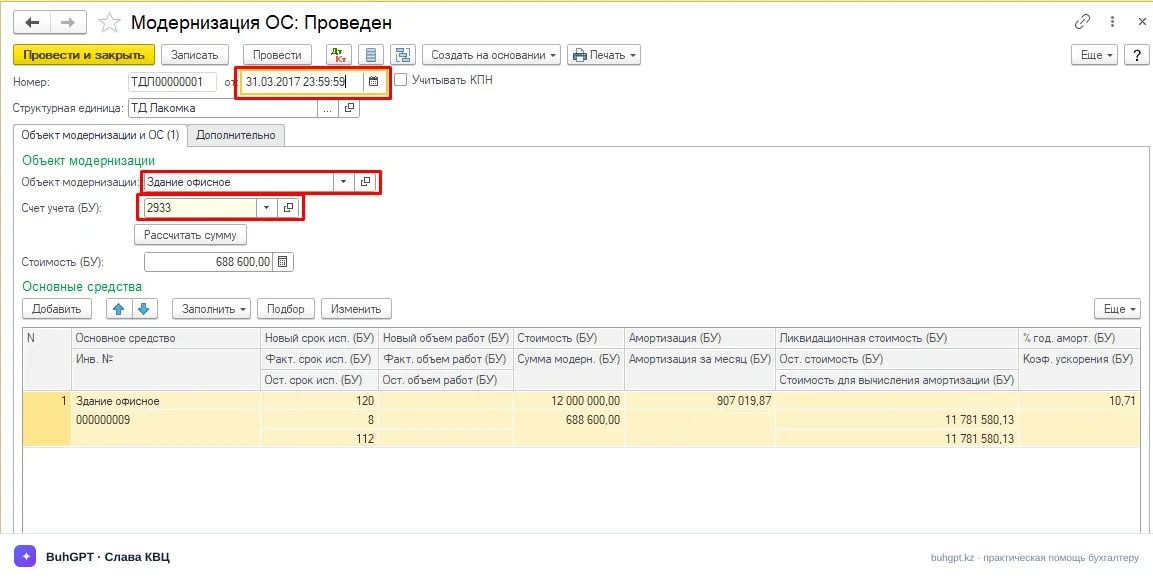
Check the modernization document. Make sure that the correct fixed asset is specified, the date is correct (within the required month), the cost increase amount is entered, and there are no duplicates. Repost it if necessary.
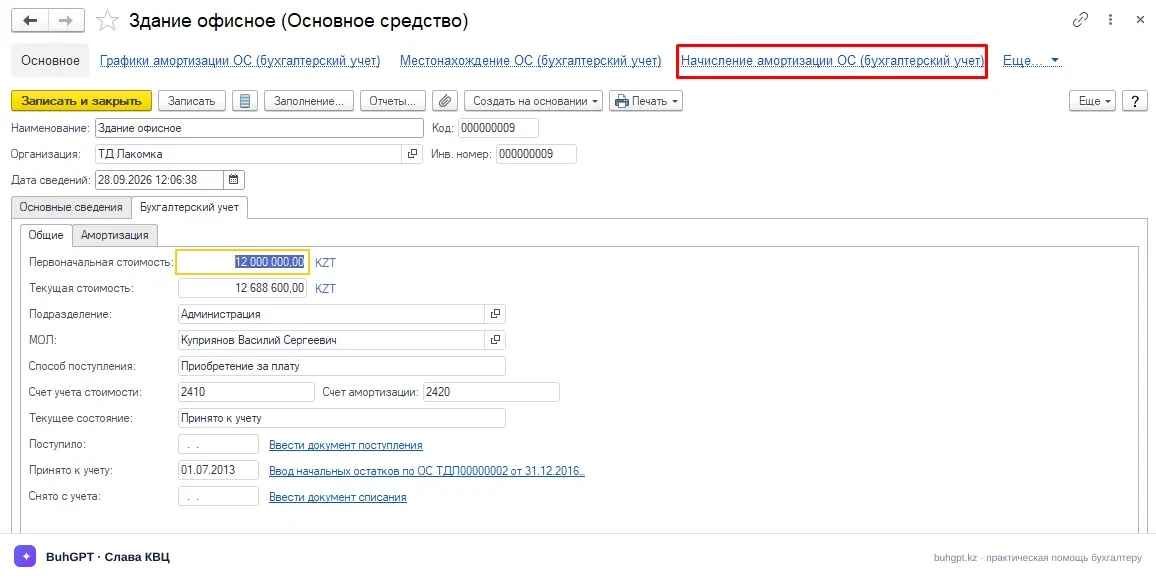
Check the asset’s depreciation parameters. Open the fixed asset record and depreciation calculation details: the method, useful life, and calculation procedure after modernization. Complete any blank fields.
Reconcile financial and tax accounting. The parameters must be consistent for both types of accounting.
Run an express check and standard reports. Accounting diagnostic tools and the trial balance for fixed asset accounts will help identify “hanging” amounts and unclosed assets.
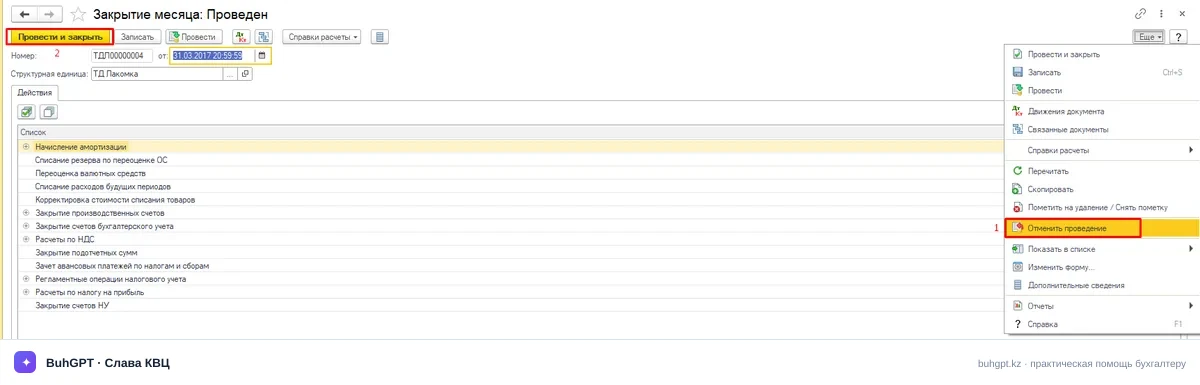
Cancel the month-end closing and repeat the operation. After correcting the data, properly restart the scheduled operation instead of manually “finishing” the closing.
Update the configuration. If the error persists after all checks and the data is known to be correct, check whether the release is current and update it if necessary.
If you cannot identify the cause yourself, record the full error message, take a screenshot, and list the actions performed—this will help the support specialist investigate the issue more quickly.
How to prevent recurrence
Prevention is less costly than investigating a closed period.
Post modernization on time—in the month to which it relates and before depreciation is calculated.
Do not enter documents retroactively without subsequently reposting the entire chain.
Check depreciation parameters immediately after modernization, not during month-end closing.
Close periods regularly and in sequence without accumulating incomplete months.
Keep the configuration on the current release and create a backup before major updates and reposting.
Maintain a month-end closing procedure—a short fixed asset checklist reduces the risk of the error recurring.
This approach turns month-end closing from a “quest” into a predictable procedure and safeguards the accuracy of reporting and the tax base.
Frequently asked questions
Why does fixed asset modernization prevent month-end closing if everything was calculated correctly before?
Modernization changes the cost and depreciation calculation parameters. If the new data is inconsistent or the document was posted out of sequence, the scheduled operation stops at this asset.
Can I simply skip the problematic fixed asset and close the month?
No. Skipping it will leave depreciation incorrect and distort the accounting records. The cause must be corrected, after which month-end closing must be properly restarted.
Does reposting documents help?
Often, yes. Restoring the sequence and reposting fixed asset documents in chronological order resolves a significant proportion of these errors.
Does the configuration need to be updated?
If the data is correct but the error can be reproduced, check whether the release is current: some calculation defects are resolved by an update. Create a backup before updating.
What should I do if nothing has helped?
Save the full error message and screenshots, and record the steps performed and
contact the support service—this will speed up diagnosis.
FAQ
Why does the scheduled “Month-End Closing” operation produce an error specifically for a modernized asset?
Modernization (extension or reconstruction) increases the carrying amount of a fixed asset and often changes its useful life. At the “Depreciation and Wear of Fixed Assets” stage, the algorithm calculates depreciation using the updated parameters. If the new parameters (useful life, depreciation method, and residual value) were not written to the information registers or the document chronology was disrupted, the calculation stops because of a mathematical or logical conflict.
From which month is depreciation calculated using the revised cost?
As a standard rule, depreciation that accounts for modernization starts in the month following the posting of the “Fixed Asset Modernization” document. If the document is posted in the current month, depreciation for the current month is calculated under the old method. Errors often occur when the application attempts to apply the new parameters retroactively or the document is posted immediately adjacent to the depreciation calculation.
Can depreciation for the problematic asset be temporarily disabled, or can the step be skipped to close the month?
This is strongly discouraged. Skipping the scheduled operation will distort the financial result, the balance of account 2420 (or similar depreciation accounts), and the tax registers. All subsequent months will be closed with an accumulated discrepancy that will still have to be corrected by reposting the period.
How should documents be reposted if modernization was entered retroactively?
The following sequence must be strictly observed:
Cancel the closing of the problematic month (and all subsequent months, if they were closed).
Check the date and time of the “Fixed Asset Modernization” document (it must be recorded before the scheduled closing operation).
Repost the documents for the asset: “Receipt of Additional Expenses/Services” -> “Fixed Asset Modernization.”
Restart the “Month-End Closing” procedure.
Which parameters in the modernization document are most often left blank?
In the tabular section of the document on the “Fixed Assets” tab, make sure that:
The “Useful Life” and “Depreciation Period” columns are completed (especially when the remaining useful life changes).
The current method for recording depreciation expenses is specified.
The modernization amount is entered for both types of accounting—financial and tax accounting (FA and TA).
Why does a discrepancy arise between financial and tax accounting (FA and TA) after modernization?
Tax accounting for fixed assets is governed by the rules for the value balances of groups (in accordance with the Tax Code of the Republic of Kazakhstan). If modernization costs are added to the asset’s cost in FA when the document is prepared but are not correctly reflected in the tax registers (or the indicator for a change in the group’s value balance is specified incorrectly), month-end closing will be unable to reconcile tax depreciation and will terminate the operation.
What should be done if the parameters are correct and the sequence has been restored, but the error persists?
Check the information registers for the asset: “Fixed Asset Depreciation Parameters (Financial Accounting)” and “Fixed Asset Events.” If they contain blank rows or duplicate entries created by manual operations, they must be corrected. Always create a backup of the infobase before manually editing any registers.